Why does the load-in and strike schedule belong in the same run of show as the guest-facing program?
Setup and teardown are where most vendor collisions happen, yet they are often left off the timeline entirely. Here is how to fold load-in and strike into one document without overwhelming the people who only need the middle.
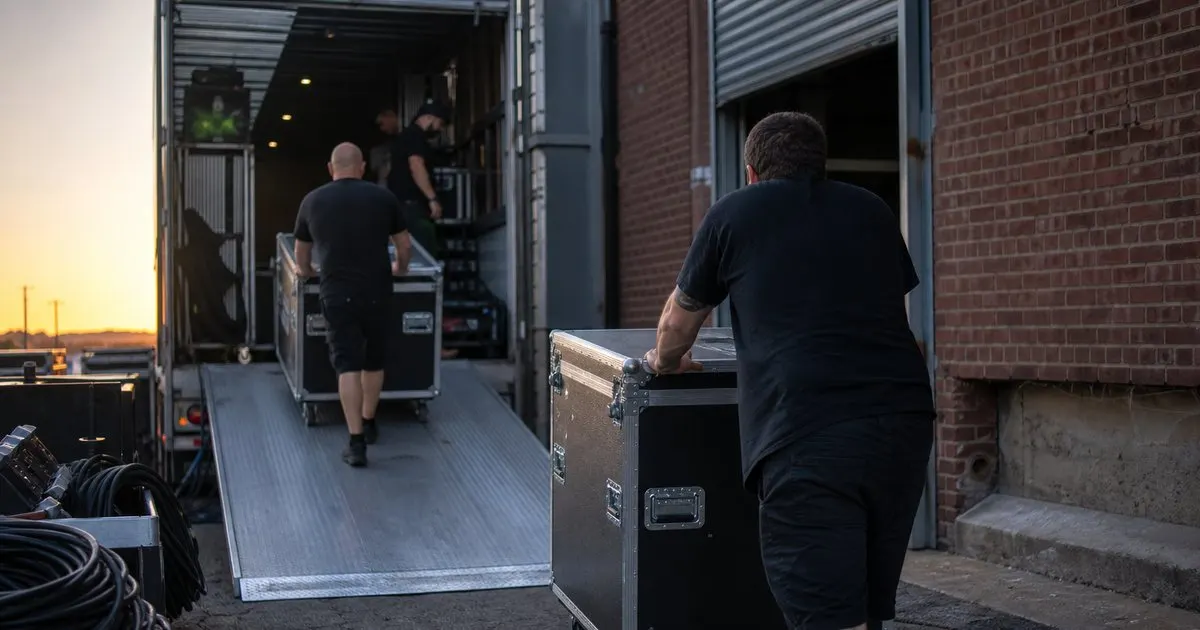
The collisions that happen before the first guest arrives
Ask any venue manager about their worst days and the stories rarely involve the program itself. They involve a florist and a lighting crew both needing the same ladder at the same spot at the same hour, a rental truck blocking the loading dock while the caterer's van idles in the street, or a band trying to soundcheck while the ceremony musicians rehearse thirty feet away. None of those conflicts show up on a timeline that starts at 'Guests arrive'. Related: Why should every moment in an event run of show have a clearly assigned owner responsible for it?
When load-in lives on the same document as the program, the planner sees the whole day as one continuous sequence of who needs which space and when. That visibility is what lets you stagger arrivals, sequence the room so the ceiling work happens before the tables go down, and reserve the dock for the vendor with the heaviest gear. The program is the visible half of the event; load-in and strike are the half that makes the visible part possible. Related: How can a planner share the event day timeline with every vendor so nobody works from an old version?
Keep reading: How do event planners build a minute-by-minute run of show that actually keeps the day on schedule?, How can a planner share the event day timeline with every vendor so nobody works from an old version?, What is the best way to adjust an event timeline on the fly when the day is running late?. See how GigTimelinr helps you event day-of run-of-show timeline builder.
Building the load-in block from the room, not from the clock
The most useful way to draft the setup portion of a run of show is spatially. Walk the venue, or the floor plan, and list what has to be in place for each area before the next vendor can work in it. Overhead rigging and draping before anything goes on the floor beneath it. Power and cable runs before tables and linens cover the paths. Staging and backline before the dance floor sections lock in. Florals and tabletop last, because they are fragile and slow to move.
Once you have that dependency list, the times almost write themselves. Each vendor's arrival is set by when the area they need becomes available, plus the time they told you they need to work. Write those as explicit lines: 'Rigging crew load-in, dock A, 8:00' and 'Rental delivery, tables and chairs, 10:30, after rigging clear'. Include the venue's own constraints, such as elevator availability or a noise curfew for power tools, as fixed lines the vendors can plan around. Related: What details and cues should a run of show include beyond just the times for each event moment?
Strike is not just load-in in reverse
Teardown has its own logic and its own pressure. Guests are often still trickling out, the venue usually has a hard out time with overtime charges attached, and the crew is tired. The order of operations changes too: the caterer needs to clear food and rentals fast for sanitation reasons, the DJ needs the room quiet only after the last guests leave, and the lighting rig cannot come down while people are still walking beneath it. A strike plan that is simply the load-in list flipped will put the wrong crew in the room first.
Write strike as its own block with a start trigger (typically 'last guest departs' or a fixed time, whichever comes first), a list of what clears in which order, and a hard end with the person responsible for the final walk-through. Note who has the venue keys or the alarm code, and who signs off on the loading dock. On the night, this block is what keeps a tired crew from doing things twice or blocking each other in the corridor.
Sharing one document without drowning the people who need only part of it
The objection to a combined timeline is fair: the officiant does not need to know when the rental truck arrives, and the rigging crew does not care when the toasts happen. The solution is not two documents. It is one master with the ability to show each person the slice that concerns them. Most planners do this with a role or vendor tag on each line and a filtered export, so the caterer's version shows kitchen and service lines plus the program moments that affect them, and nothing else. Related: How do event planners build a minute-by-minute run of show that actually keeps the day on schedule?
We built GigTimelinr around exactly this idea, one timeline with per-vendor views, because the alternative we kept seeing was a setup spreadsheet, a program document, and a strike email that disagreed with each other by Friday afternoon. Whatever tool you use, the test is simple: if a vendor asks 'what time do I need to be out?' the answer should come from the same source of truth as 'what time does the ceremony start?'
- Most vendor conflicts happen during setup and teardown, which a program-only timeline never shows.
- Draft load-in from spatial dependencies (overhead first, floor next, fragile last) and let the times follow.
- Write strike as its own block with a start trigger, a clearing order, and a named person for the final walk-through.
- Keep one master document and give each vendor a filtered view rather than maintaining separate schedules.

Julien Jimenez
Julien Jimenez is an independent software builder based in Paris. He designs, ships, and operates focused SaaS products for small businesses and independent professionals. Read the full author page.
A run of show that holds
Event day-of run-of-show timeline builder. GigTimelinr is built to help you put this into practice.
Build your run of showMore from the GigTimelinr blog


Get the GigTimelinr playbook
Practical guides on event production, straight to your inbox as we publish them. No spam, unsubscribe any time.